Fortinet
Heuristic Enhancement
UX Evaluation
Can our file uploader do better?
Can our file uploader do better?
Can our file uploader do better?
Can our file uploader do better?
Can our file uploader do better?
Can our file uploader do better?
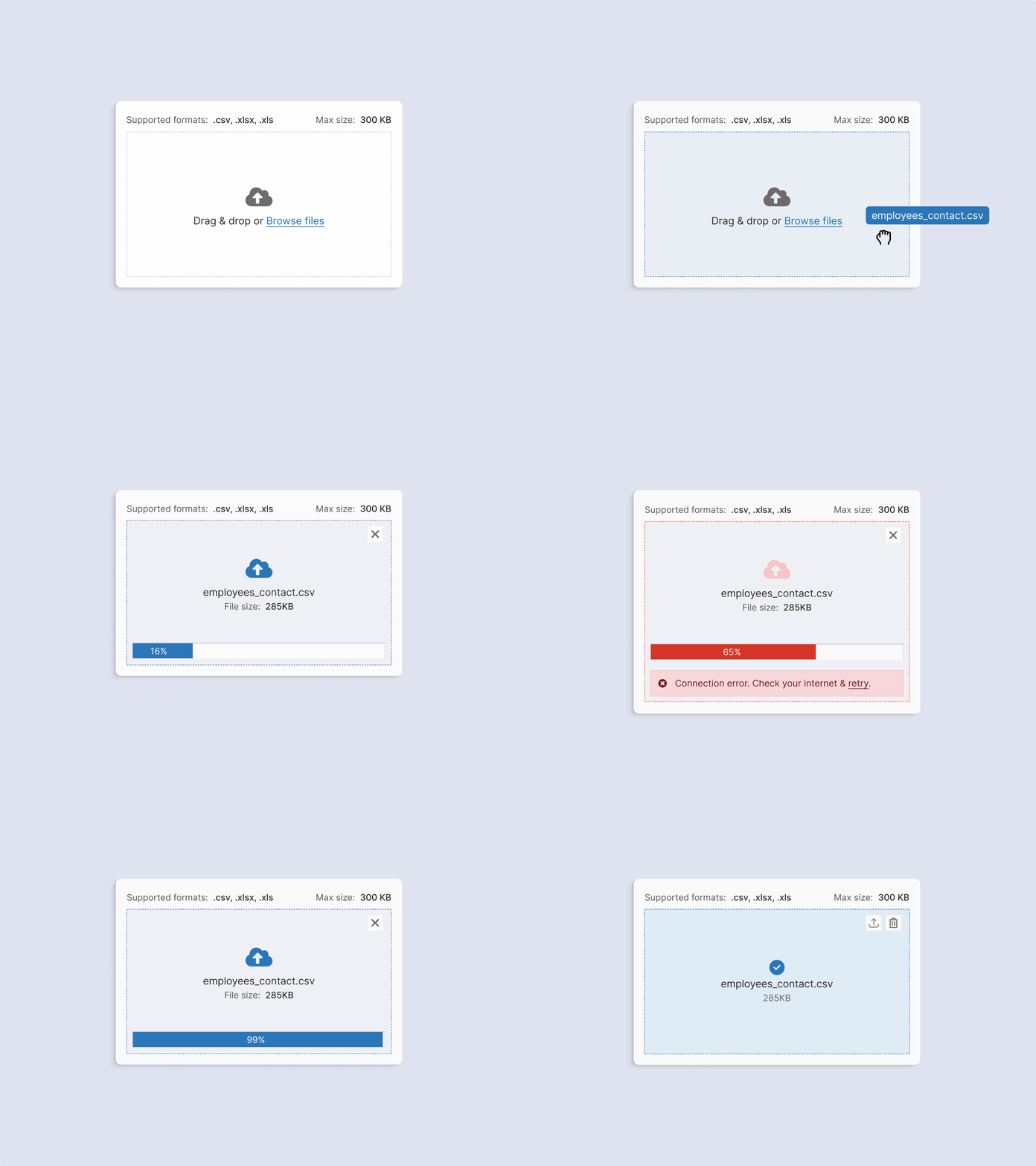
A heuristic makeover case study demonstrates enhancements to a file uploader component through user-centered design principles.
A heuristic makeover case study demonstrates enhancements to a file uploader component through user-centered design principles.
A heuristic makeover case study demonstrates enhancements to a file uploader component through user-centered design principles.
A heuristic makeover case study demonstrates enhancements to a file uploader component through user-centered design principles.
A heuristic makeover case study demonstrates enhancements to a file uploader component through user-centered design principles.
A heuristic makeover case study demonstrates enhancements to a file uploader component through user-centered design principles.
June 2023 - July 2023
Timeline
Self-initiated UX Evaluator
Role
June 2023 - July 2023
Timeline
Self-initiated UX Evaluator
Role
Background
Background
Our new file uploader needed a usability boost
Our new file uploader needed a usability boost
The file picker was added to our design system to meet new product requirements. Out of curiosity, we conducted a heuristic evaluation from a user's perspective. This case study logs the evaluation criteria, results, use cases, prioritization, and recommendations.
The file picker was added to our design system to meet new product requirements. Out of curiosity, we conducted a heuristic evaluation from a user's perspective. This case study logs the evaluation criteria, results, use cases, prioritization, and recommendations.
Methodology
Methodology
Conducted heuristic evaluation based on Nielsen’s 10 Usability Heuristics for User Interface Design.
Conducted heuristic evaluation based on Nielsen’s 10 Usability Heuristics for User Interface Design.
Overview
Overview
Purpose of file uploader
Purpose of file uploader
Enables users to upload files from their devices to the application.
Enables users to upload files from their devices to the application.
Key Features
Key Features
Shows all acceptable file formats
Drag-and-drop functionality
Reupload or delete files
Error notifications for unsupported file types or sizes
Shows all acceptable file formats
Drag-and-drop functionality
Reupload or delete files
Error notifications for unsupported file types or sizes
Tested Scenarios
Tested Scenarios
Single/multiple file selection
Instant vs. button-triggered upload
Accidental file removal
Single/multiple file selection
Instant vs. button-triggered upload
Accidental file removal
Metric system
Metric system
Factors
Factors
1
Frequency and Scope
How often does the issue occur, and how widespread is its impact across different user scenarios and use cases? Is it isolated or common across various interactions?
1
Frequency and Scope
How often does the issue occur, and how widespread is its impact across different user scenarios and use cases? Is it isolated or common across various interactions?
1
Frequency and Scope
How often does the issue occur, and how widespread is its impact across different user scenarios and use cases? Is it isolated or common across various interactions?
1
Frequency and Scope
How often does the issue occur, and how widespread is its impact across different user scenarios and use cases? Is it isolated or common across various interactions?
1
Frequency and Scope
How often does the issue occur, and how widespread is its impact across different user scenarios and use cases? Is it isolated or common across various interactions?
2
Experience Impact
How does the issue affect the overall user experience? Does it lead to frustration, confusion, or dissatisfaction, and to what degree?
2
Experience Impact
How does the issue affect the overall user experience? Does it lead to frustration, confusion, or dissatisfaction, and to what degree?
2
Experience Impact
How does the issue affect the overall user experience? Does it lead to frustration, confusion, or dissatisfaction, and to what degree?
2
Experience Impact
How does the issue affect the overall user experience? Does it lead to frustration, confusion, or dissatisfaction, and to what degree?
2
Experience Impact
How does the issue affect the overall user experience? Does it lead to frustration, confusion, or dissatisfaction, and to what degree?
Severity Ratings
Severity Ratings
S0
No issues
S0
No issues
S0
No issues
S0
No issues
S0
No issues
S1
Cosmetic fixes (low priority)
S1
Cosmetic fixes (low priority)
S1
Cosmetic fixes (low priority)
S1
Cosmetic fixes (low priority)
S1
Cosmetic fixes (low priority)
S2
Minor usability issues (medium priority)
S2
Minor usability issues (medium priority)
S2
Minor usability issues (medium priority)
S2
Minor usability issues (medium priority)
S2
Minor usability issues (medium priority)
S3
Major usability issues (high priority)
S3
Major usability issues (high priority)
S3
Major usability issues (high priority)
S3
Major usability issues (high priority)
S3
Major usability issues (high priority)
S4
Critical issues (fix immediately)
S4
Critical issues (fix immediately)
S4
Critical issues (fix immediately)
S4
Critical issues (fix immediately)
S4
Critical issues (fix immediately)
Heuristic Evaluation Process
Heuristic Evaluation Process
I used a tailored evaluation sheet for each heuristic rule, assessed the severity of each issue, and provided recommendations. Based on these, I redesigned parts of the component using our design system.
H1 - Visibility of System Status
H1 - Visibility of System Status
S3
Major usability issues (high priority)
S3
Major usability issues (high priority)
S3
Major usability issues (high priority)
S3
Major usability issues (high priority)
S3
Major usability issues (high priority)
Issue
Issue
Issue
Issue
Issue
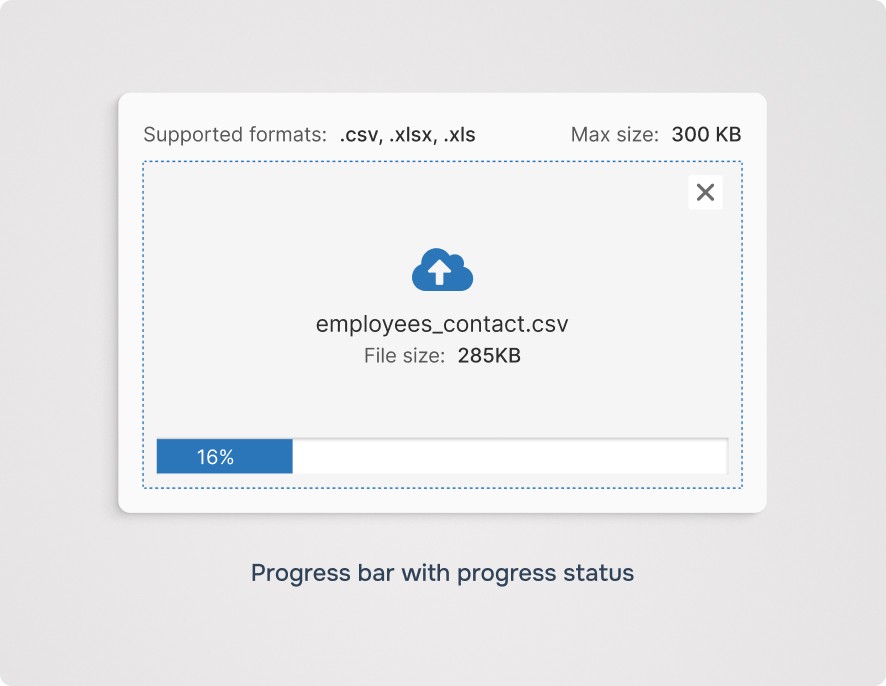
Recommendation
Recommendation
Recommendation
Recommendation
Recommendation
H2 - Match Between System and the Real World
H2 - Match Between System and the Real World
No violation found
No violation found
No violation found
No violation found
No violation found
H3- User Control and Freedom
H3- User Control and Freedom
S3
Major usability issues (high priority)
S3
Major usability issues (high priority)
S3
Major usability issues (high priority)
S3
Major usability issues (high priority)
S3
Major usability issues (high priority)
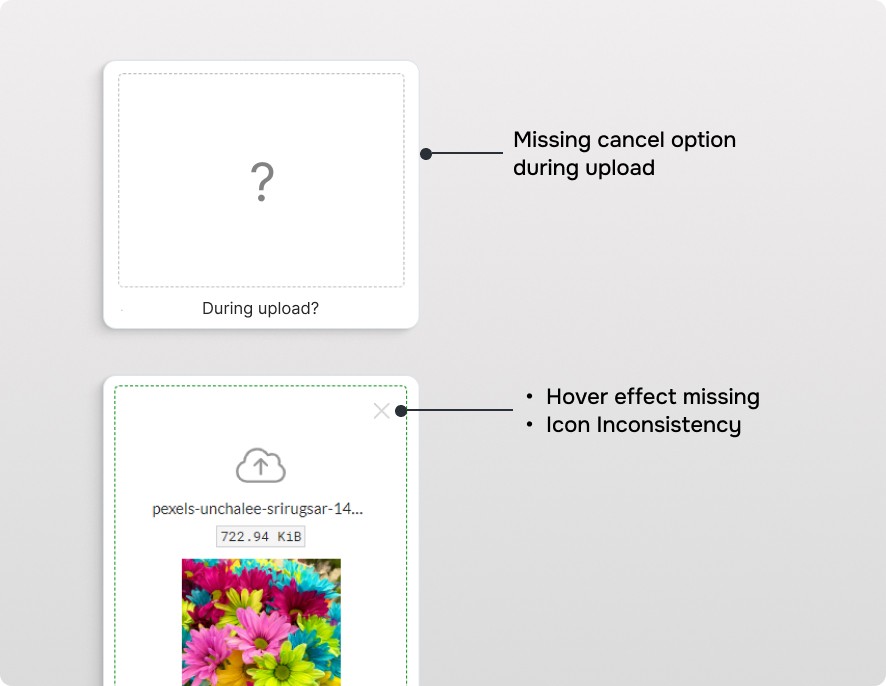
Issue
Issue
Issue
Issue
Issue
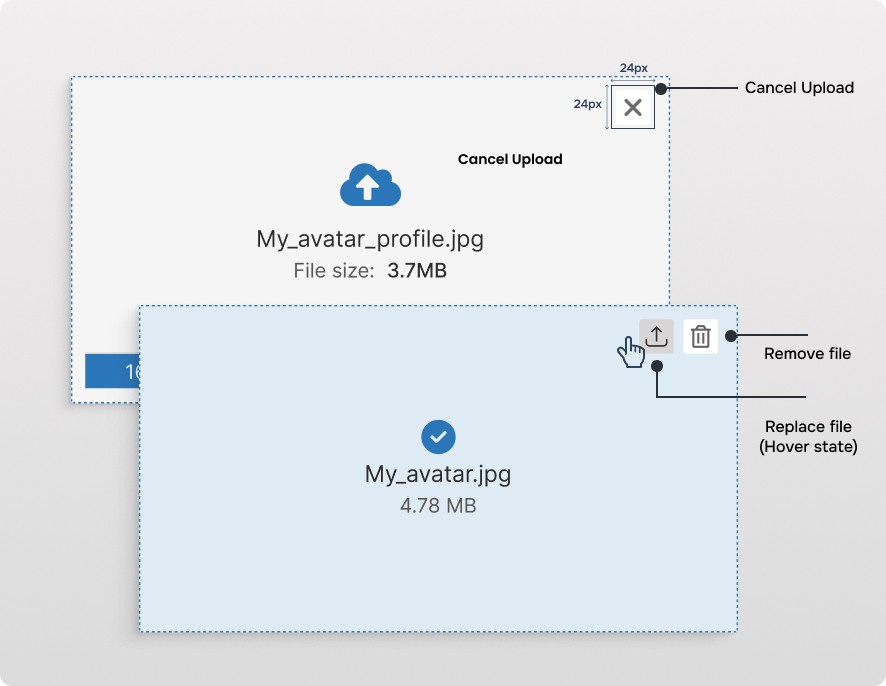
Recommendation
Recommendation
Recommendation
Recommendation
Recommendation
H4 - Consistency and Standards
H4 - Consistency and Standards
S2
Minor usability issues (medium priority)
S2
Minor usability issues (medium priority)
S2
Minor usability issues (medium priority)
S2
Minor usability issues (medium priority)
S2
Minor usability issues (medium priority)
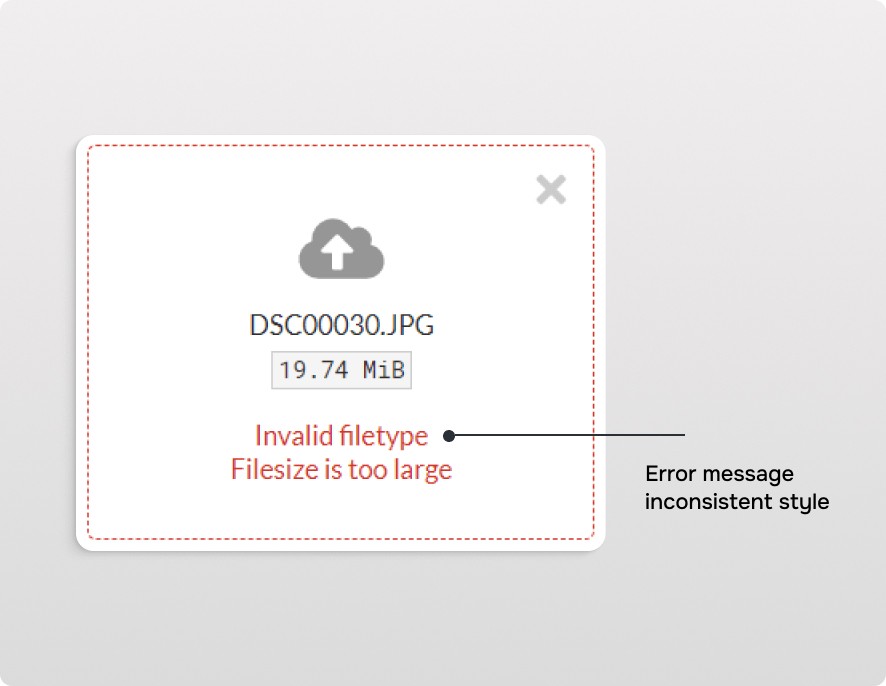
Issue
Issue
Issue
Issue
Issue
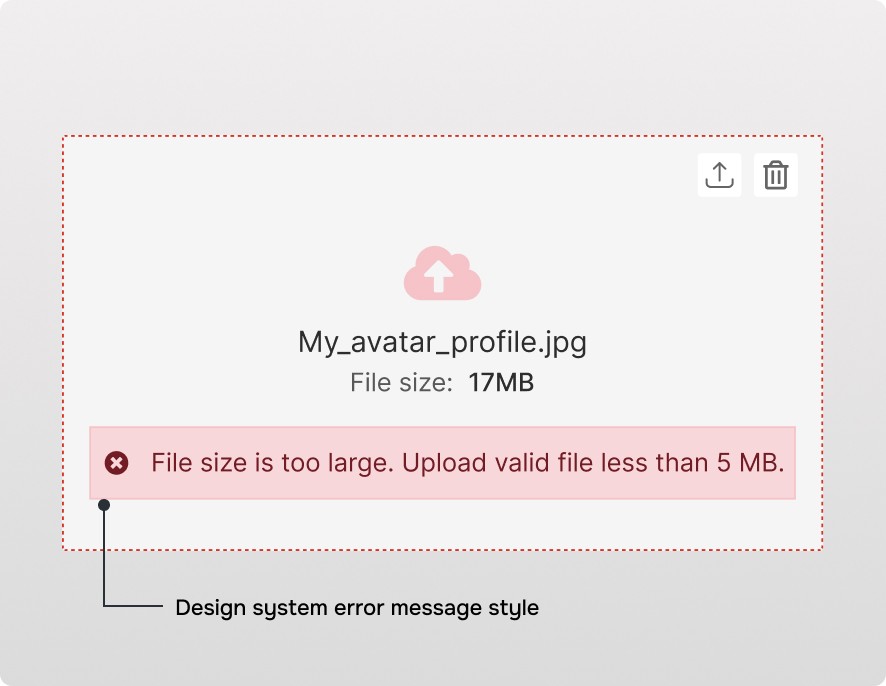
Recommendation
Recommendation
Recommendation
Recommendation
Recommendation
H5 - Error Prevention
H5 - Error Prevention
S1
Cosmetic fixes (low priority)
S1
Cosmetic fixes (low priority)
S1
Cosmetic fixes (low priority)
S1
Cosmetic fixes (low priority)
S1
Cosmetic fixes (low priority)
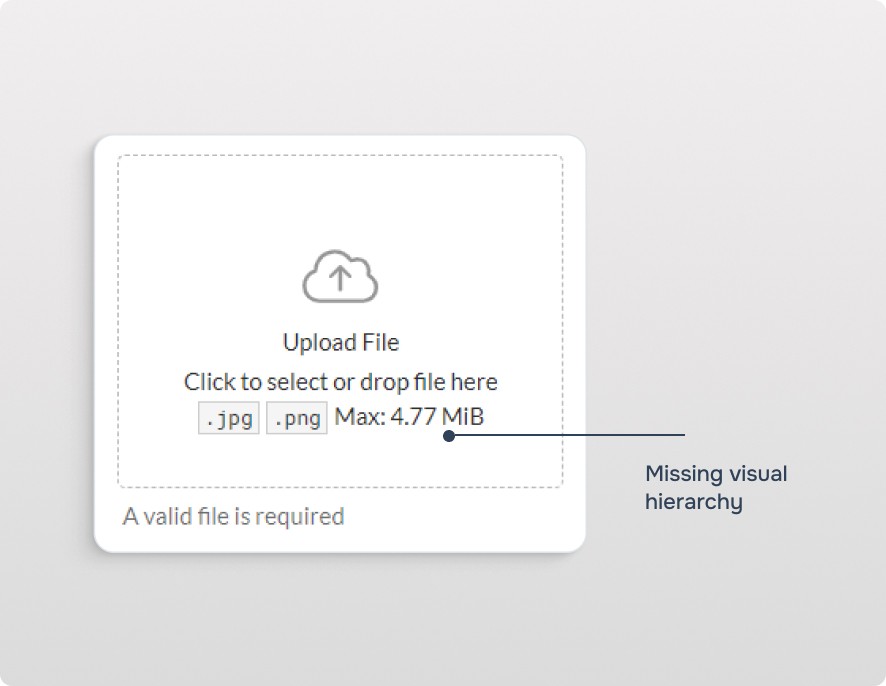
Issue
Issue
Issue
Issue
Issue
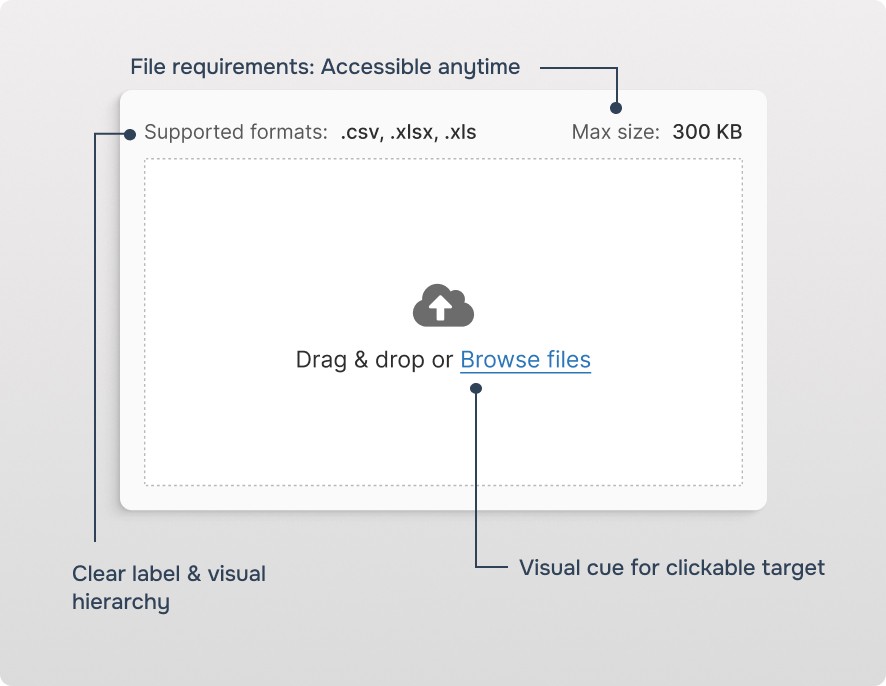
Recommendation
Recommendation
Recommendation
Recommendation
Recommendation
H6- Recognition Rather Than Recall
H6- Recognition Rather Than Recall
No violation found
No violation found
No violation found
No violation found
No violation found
H7 - Flexibility and Efficiency of Use
H7 - Flexibility and Efficiency of Use
S2
Minor usability issues (medium priority)
S2 (Minor) with potential for S3. It can be bump to S3 if multi-file uploads are common or time-consuming in our product's workflows.
S2
Minor usability issues (medium priority)
S2 (Minor) with potential for S3. It can be bump to S3 if multi-file uploads are common or time-consuming in our product's workflows.
S2
Minor usability issues (medium priority)
S2 (Minor) with potential for S3. It can be bump to S3 if multi-file uploads are common or time-consuming in our product's workflows.
S2
Minor usability issues (medium priority)
S2 (Minor) with potential for S3. It can be bump to S3 if multi-file uploads are common or time-consuming in our product's workflows.
S2
Minor usability issues (medium priority)
S2 (Minor) with potential for S3. It can be bump to S3 if multi-file uploads are common or time-consuming in our product's workflows.
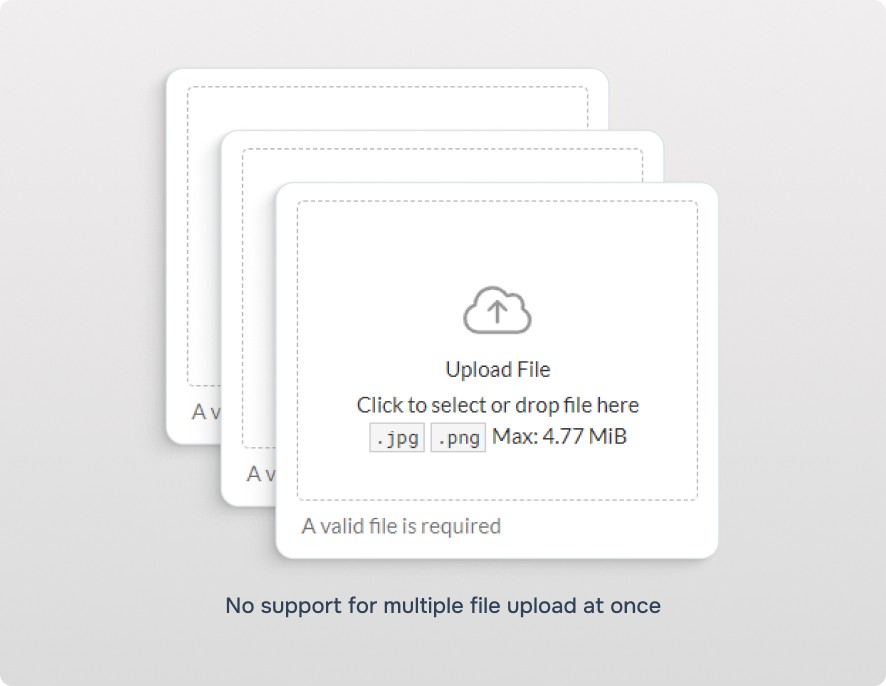
Issue
Issue
Issue
Issue
Issue
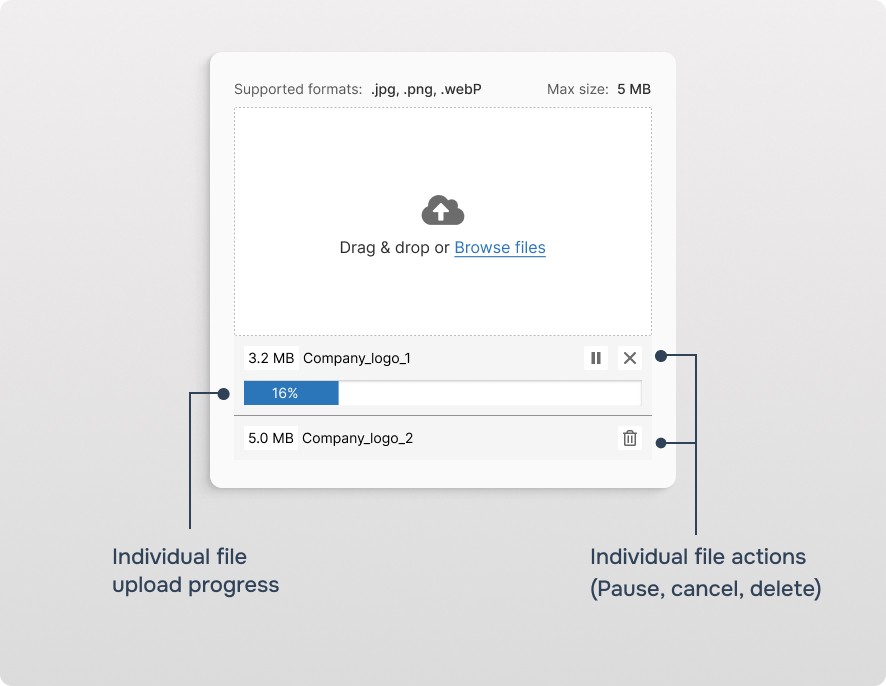
Recommendation
Recommendation
Recommendation
Recommendation
Recommendation
H8 - Aesthetic and Minimalist Design
H8 - Aesthetic and Minimalist Design
No violation found
No violation found
No violation found
No violation found
No violation found
H9 - Help Users Recognize, Diagnose, and Recover from Errors
H9 - Help Users Recognize, Diagnose, and Recover from Errors
S1
Cosmetic fixes (low priority)
S1
Cosmetic fixes (low priority)
S1
Cosmetic fixes (low priority)
S1
Cosmetic fixes (low priority)
S1
Cosmetic fixes (low priority)
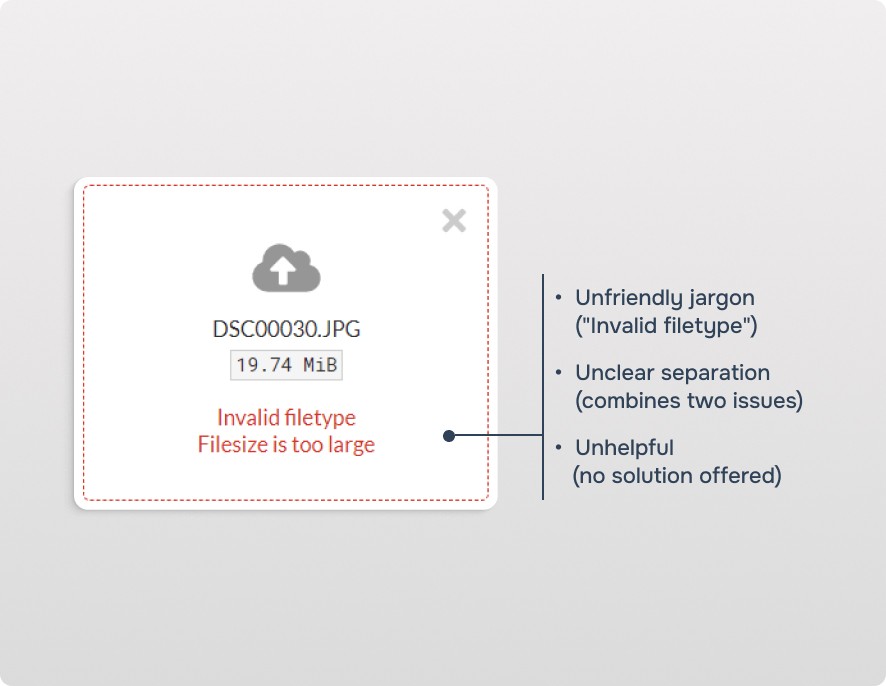
Issue
Issue
Issue
Issue
Issue
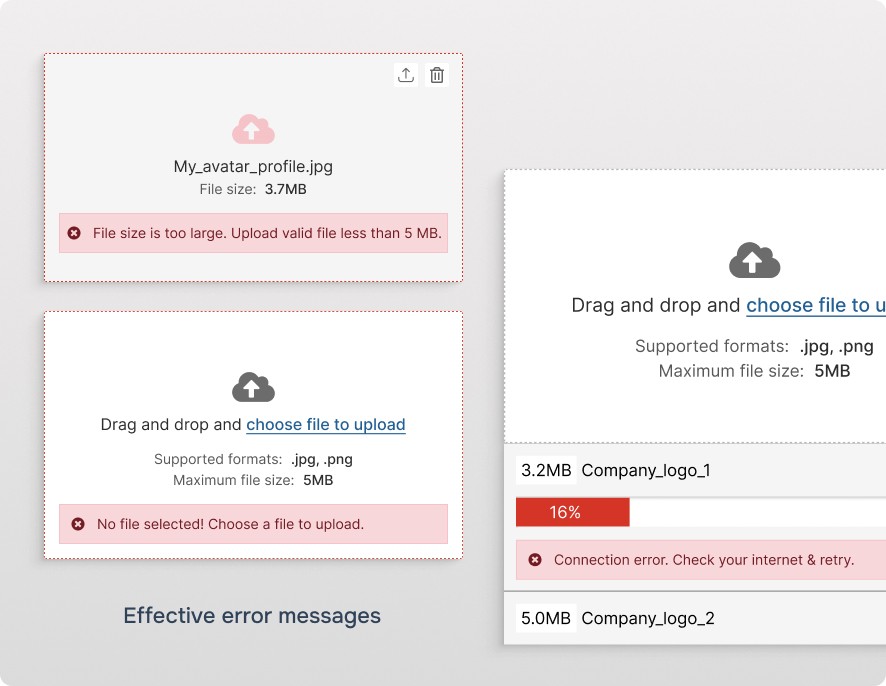
Recommendation
Recommendation
Recommendation
Recommendation
Recommendation
H10 - Help and Documentation
H10 - Help and Documentation
S1
Cosmetic fixes (low priority)
S1
Cosmetic fixes (low priority)
S1
Cosmetic fixes (low priority)
S1
Cosmetic fixes (low priority)
S1
Cosmetic fixes (low priority)
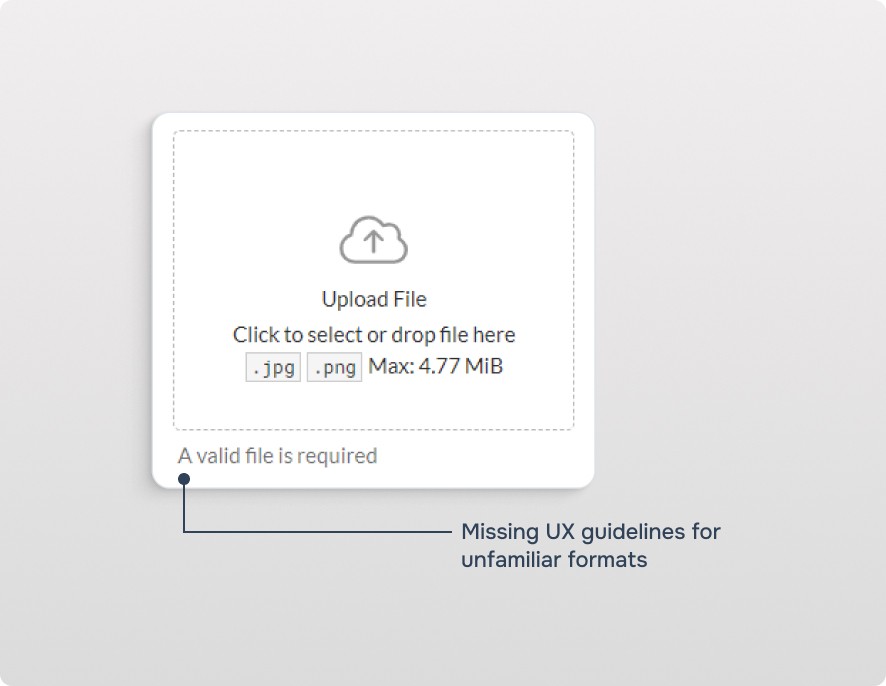
Issue
Issue
Issue
Issue
Issue
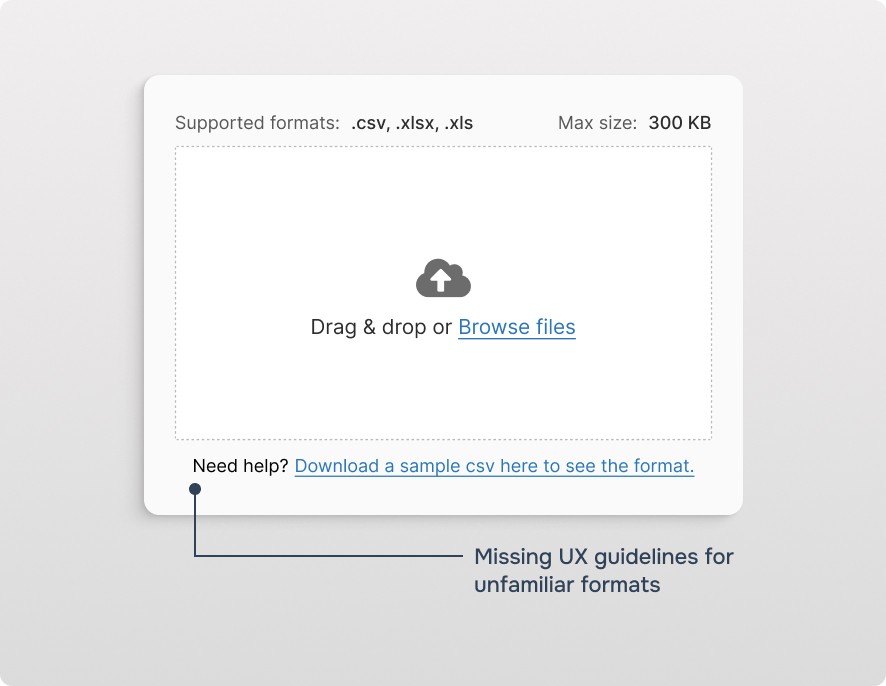
Recommendation
Recommendation
Recommendation
Recommendation
Recommendation
Heuristic Evaluation Summary
Heuristic Evaluation Summary
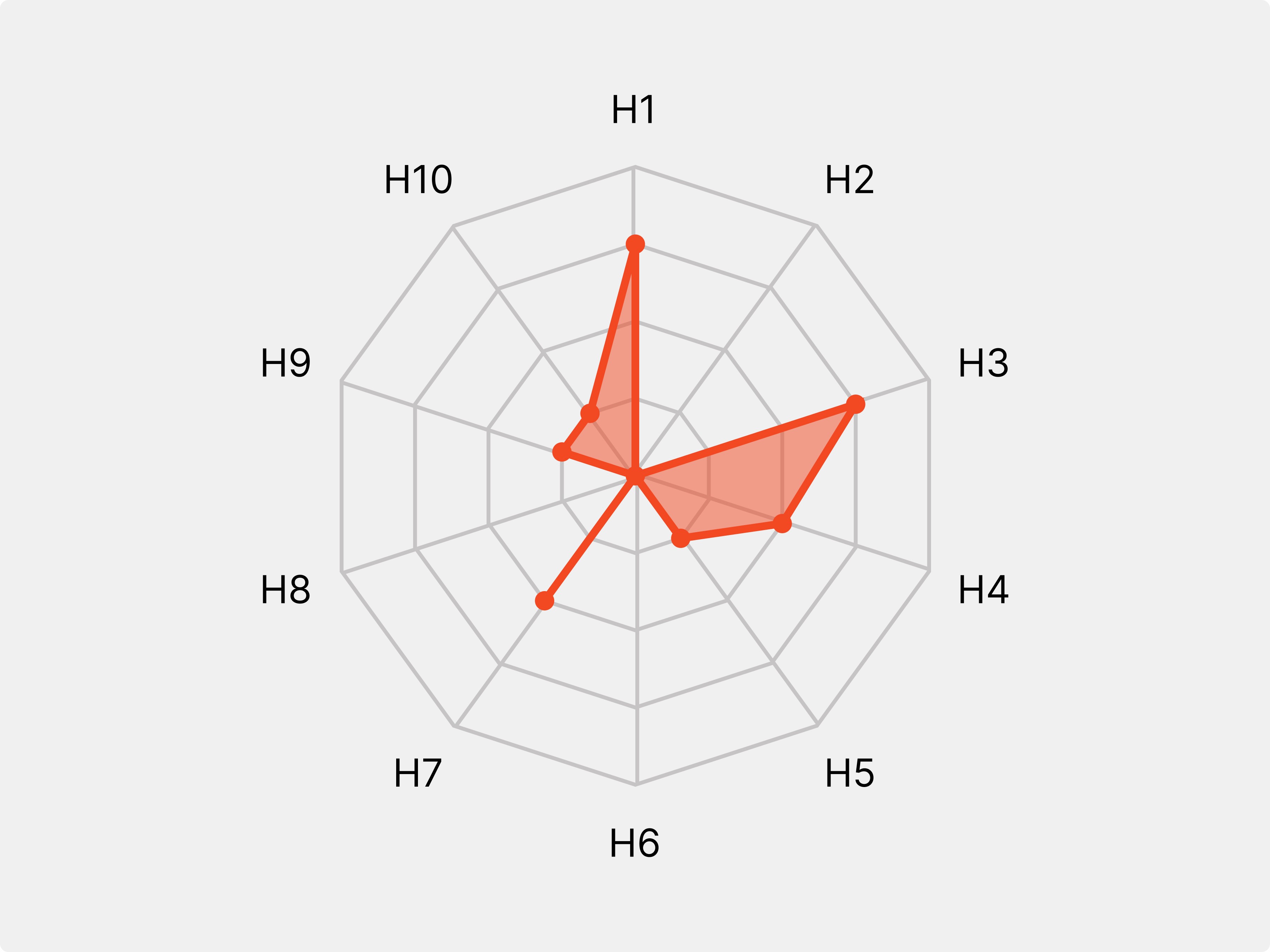
I generated a radar chart to provide an overview of the areas where the file uploader component is lacking. This visual representation highlights the strengths and weaknesses identified during the evaluation.
#
#
Heuristic
Heuristic
Severity
Severity
H1
H1
Visibility of System Status
Visibility of System Status
3
3
H2
H2
Match Between System and the Real World
Match Between System and the Real World
0
0
H3
H3
User Control and Freedom
User Control and Freedom
3
3
H4
H4
Consistency and Standards
Consistency and Standards
2
2
2
H5
H5
Error Prevention
Error Prevention
1
1
H6
H6
Recognition Rather Than Recall
Recognition Rather Than Recall
0
0
H7
H7
Flexibility and Efficiency of Use
Flexibility and Efficiency of Use
2
2
H8
H8
Aesthetic and Minimalist Design
Aesthetic and Minimalist Design
0
0
H9
H9
Help Users Recognize, Diagnose, and Recover from Errors
Help Users Recognize, Diagnose, and Recover from Errors
1
1
H10
H10
Help and Documentation
Help and Documentation
1
1
Accessibility Guidelines
Accessibility Guidelines
1
Labeling form fields
All form fields should have a clear and visible label associated with them.
1
Labeling form fields
All form fields should have a clear and visible label associated with them.
1
Labeling form fields
All form fields should have a clear and visible label associated with them.
<label htmlFor="file-upload">Select File:</label>
<input type="file" id="file-upload" required>
2
Labeling form fields
Clearly indicate required fields within their labels.
2
Labeling form fields
Clearly indicate required fields within their labels.
2
Labeling form fields
Clearly indicate required fields within their labels.
<label htmlFor="file-upload">Select File *:</label>
<input type="file" id="file-upload" required>
3
Associating Help or Error Text with File Picker
Connect the File Picker component to its related help or error text using the aria-describedby attribute.
3
Associating Help or Error Text with File Picker
Connect the File Picker component to its related help or error text using the aria-describedby attribute.
3
Associating Help or Error Text with File Picker
Connect the File Picker component to its related help or error text using the aria-describedby attribute.
<label htmlFor="file-upload">Select File *:</label>
<input type="file" id="file-upload" required aria-describedby="file-upload-help">
<p id="file-upload-help">Supported file formats: PDF, DOCX, TXT</p>
Next steps
Proposal Development: Created a comprehensive document outlining findings, recommendations, and potential impact.
Stakeholder Communication: Discussed and refined the proposal based on stakeholder feedback, paving the way for implementation.
Learnings
Heuristics 101: Performed a first-time heuristic evaluation, gaining a practical understanding of applying user-centered design principles.
B2B File Uploader Complexity: Discovered the diverse and potentially intricate nature of file uploaders in B2B environments.
Sparking Discussions, Sparking Ideas: Learned how stakeholder engagement during the heuristic evaluation led to valuable discussions and ignited initiatives for further improvement.