Android Application
Zero to one product
Swipe to Declutter - Sponge
Swipe to Declutter - Sponge
Swipe to Declutter - Sponge
Swipe to Declutter - Sponge
Swipe to Declutter - Sponge
Swipe to Declutter - Sponge
Swipe-driven android app for effortless gallery decluttering
Swipe-driven android app for effortless gallery decluttering
Swipe-driven android app for effortless gallery decluttering
Swipe-driven android app for effortless gallery decluttering
Swipe-driven android app for effortless gallery decluttering
Swipe-driven android app for effortless gallery decluttering
Apr 2023 - present
Timeline
Researcher & Designer
Role
Apr 2023 - present
Timeline
Researcher & Designer
Role
Background
Background
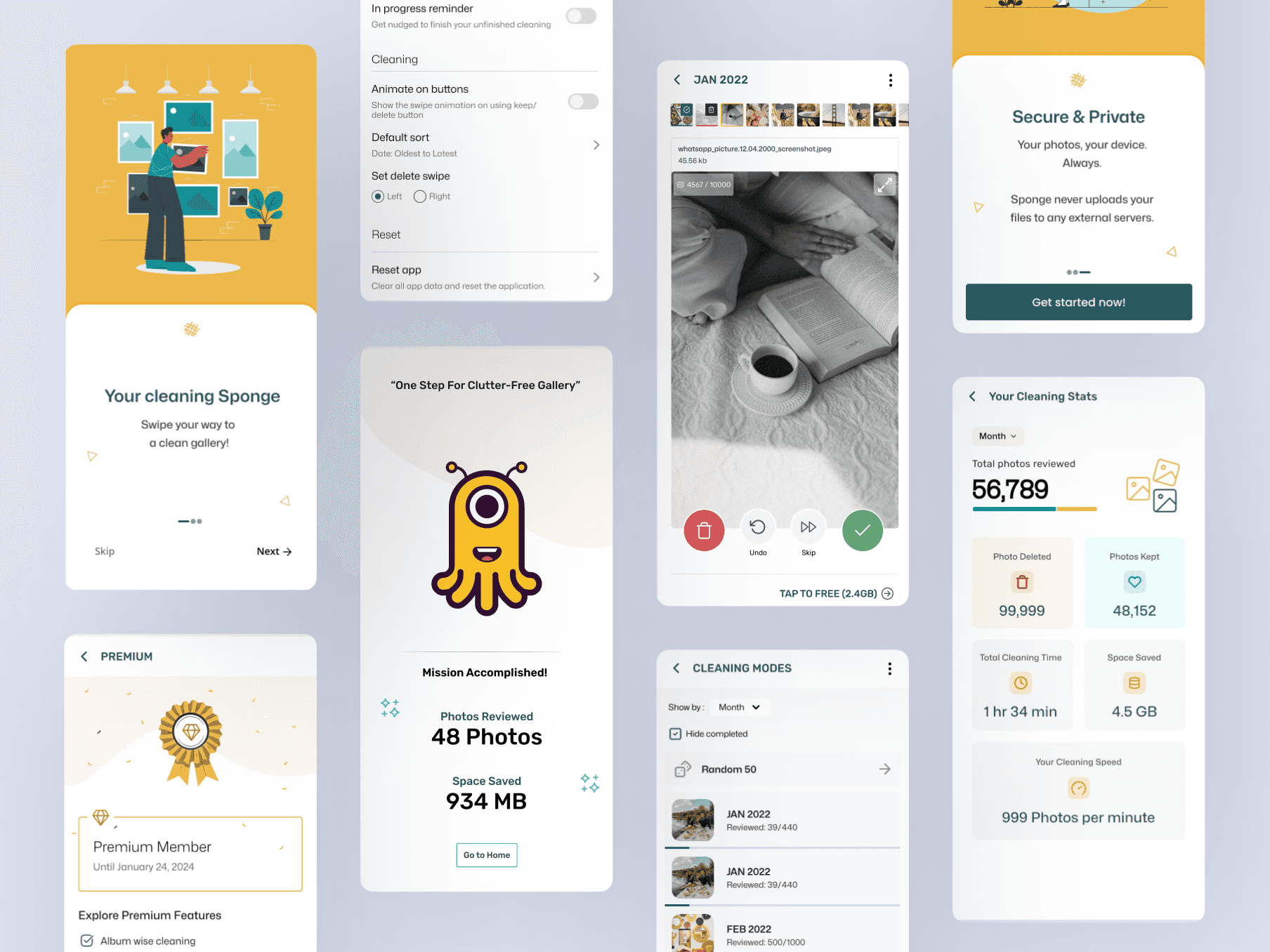
Ever get that panicked feeling when you see the 'storage full' notification? Me too. That's why I created a swipe app that turns gallery cleaning into a game, making image management a habit you'll actually enjoy.
Ever get that panicked feeling when you see the 'storage full' notification? Me too. That's why I created a swipe app that turns gallery cleaning into a game, making image management a habit you'll actually enjoy.
Solution
Solution
1
Just swipe it!
Research says swiping feels natural and engaging, boosting user experience.
1
Just swipe it!
Research says swiping feels natural and engaging, boosting user experience.
1
Just swipe it!
Research says swiping feels natural and engaging, boosting user experience.
1
Just swipe it!
Research says swiping feels natural and engaging, boosting user experience.
1
Just swipe it!
Research says swiping feels natural and engaging, boosting user experience.
2
Break it Down
Break down photo selection into smaller, manageable "chunks" to motivate users.
2
Break it Down
Break down photo selection into smaller, manageable "chunks" to motivate users.
2
Break it Down
Break down photo selection into smaller, manageable "chunks" to motivate users.
2
Break it Down
Break down photo selection into smaller, manageable "chunks" to motivate users.
2
Break it Down
Break down photo selection into smaller, manageable "chunks" to motivate users.
3
Track progress
- Highlight how many photos have been reviewed. - No need to remember what’s been reviewed – it’s like a magic bookmark in the cleaning process.
3
Track progress
- Highlight how many photos have been reviewed. - No need to remember what’s been reviewed – it’s like a magic bookmark in the cleaning process.
3
Track progress
- Highlight how many photos have been reviewed. - No need to remember what’s been reviewed – it’s like a magic bookmark in the cleaning process.
3
Track progress
- Highlight how many photos have been reviewed. - No need to remember what’s been reviewed – it’s like a magic bookmark in the cleaning process.
3
Track progress
- Highlight how many photos have been reviewed. - No need to remember what’s been reviewed – it’s like a magic bookmark in the cleaning process.
That's why I created a swipe app that turns gallery cleaning into a game, making image management a habit you'll actually enjoy.
That's why I created a swipe app that turns gallery cleaning into a game, making image management a habit you'll actually enjoy.
Impact
Impact
19K
Apr 2023 - Present
~4.3K
Monthly active users
10 Million
Photos cleaned by Sponge
19K
Apr 2023 - Present
~4.3K
Monthly active users
10 Million
Photos cleaned by Sponge
MVP Launch Shots
MVP Launch Shots
What did users love? ❤️
What did users love? ❤️

1
UI
Users appreciate the clean and intuitive design of the app—clear onboarding instructions.
1
UI
Users appreciate the clean and intuitive design of the app—clear onboarding instructions.
1
UI
Users appreciate the clean and intuitive design of the app—clear onboarding instructions.
1
UI
Users appreciate the clean and intuitive design of the app—clear onboarding instructions.
1
UI
Users appreciate the clean and intuitive design of the app—clear onboarding instructions.
2
Gesture
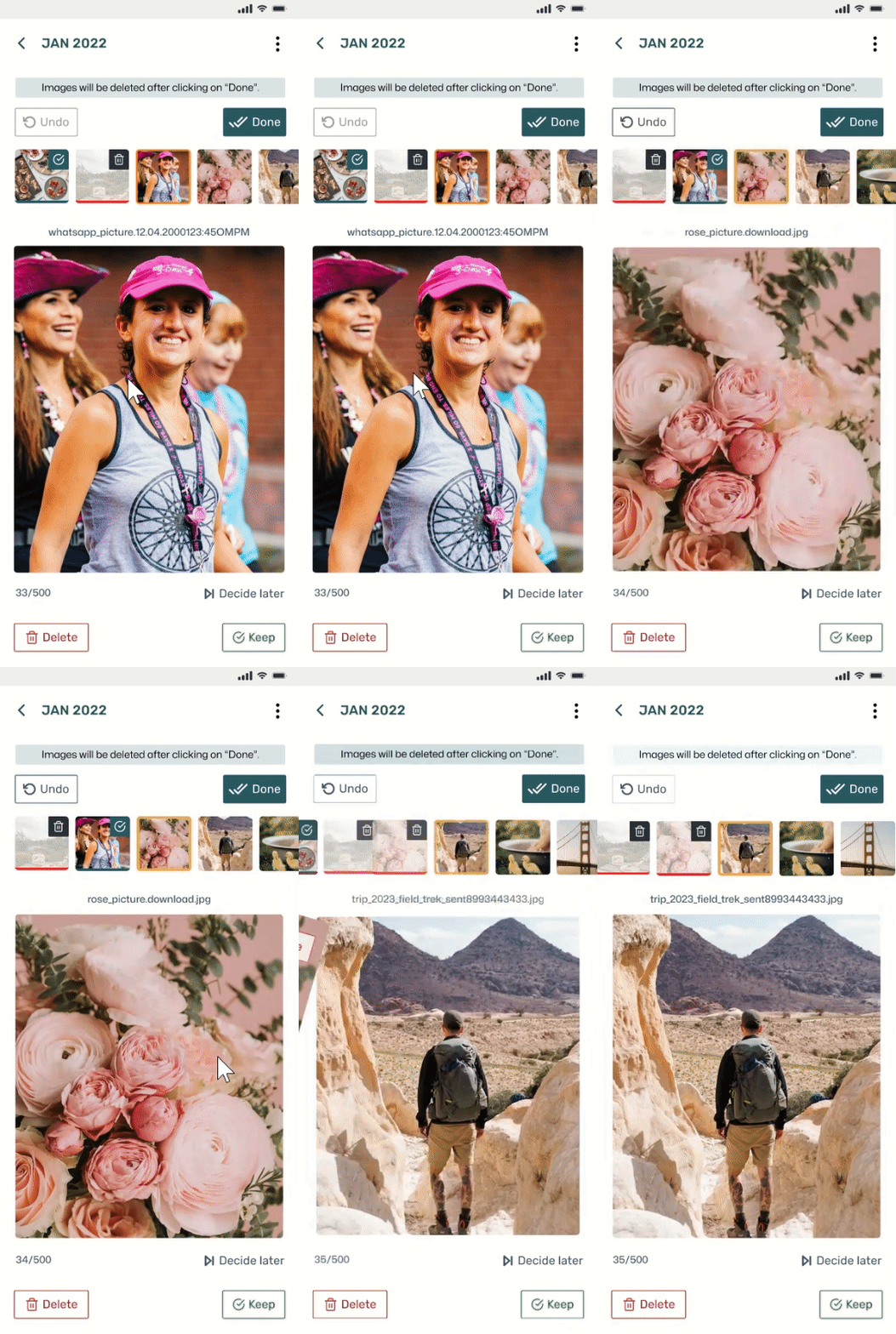
The effective use of swipe gestures resonates well with users, meeting their expectations for a seamless and natural experience.
2
Gesture
The effective use of swipe gestures resonates well with users, meeting their expectations for a seamless and natural experience.
2
Gesture
The effective use of swipe gestures resonates well with users, meeting their expectations for a seamless and natural experience.
2
Gesture
The effective use of swipe gestures resonates well with users, meeting their expectations for a seamless and natural experience.
2
Gesture
The effective use of swipe gestures resonates well with users, meeting their expectations for a seamless and natural experience.

3
Tracking progress
Users love the flexibility of cleaning in chunks, appreciating the option to avoid overwhelming tasks while still maintaining progress without the need to track.
3
Tracking progress
Users love the flexibility of cleaning in chunks, appreciating the option to avoid overwhelming tasks while still maintaining progress without the need to track.
3
Tracking progress
Users love the flexibility of cleaning in chunks, appreciating the option to avoid overwhelming tasks while still maintaining progress without the need to track.
3
Tracking progress
Users love the flexibility of cleaning in chunks, appreciating the option to avoid overwhelming tasks while still maintaining progress without the need to track.
3
Tracking progress
Users love the flexibility of cleaning in chunks, appreciating the option to avoid overwhelming tasks while still maintaining progress without the need to track.
Key user insights
Key user insights
1
Crop
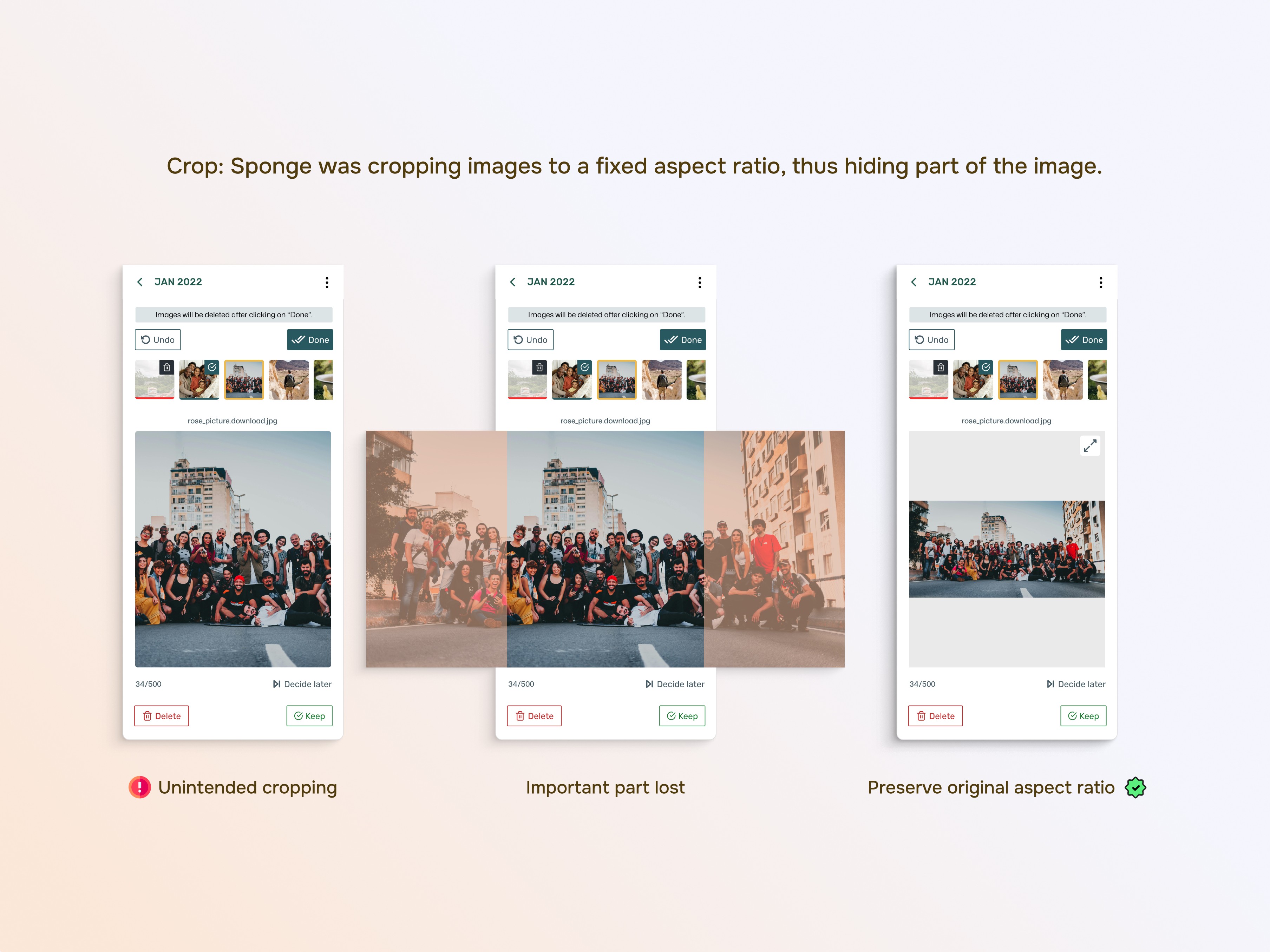
Sponge crops images to a fixed ratio, thus hiding part of the image. Preserve Original Aspect Ratio: To enhance user clarity, displaying pictures in their original aspect ratio is recommended.
1
Crop
Sponge crops images to a fixed ratio, thus hiding part of the image. Preserve Original Aspect Ratio: To enhance user clarity, displaying pictures in their original aspect ratio is recommended.
1
Crop
Sponge crops images to a fixed ratio, thus hiding part of the image. Preserve Original Aspect Ratio: To enhance user clarity, displaying pictures in their original aspect ratio is recommended.
1
Crop
Sponge crops images to a fixed ratio, thus hiding part of the image. Preserve Original Aspect Ratio: To enhance user clarity, displaying pictures in their original aspect ratio is recommended.
1
Crop
Sponge crops images to a fixed ratio, thus hiding part of the image. Preserve Original Aspect Ratio: To enhance user clarity, displaying pictures in their original aspect ratio is recommended.
2
Zoom
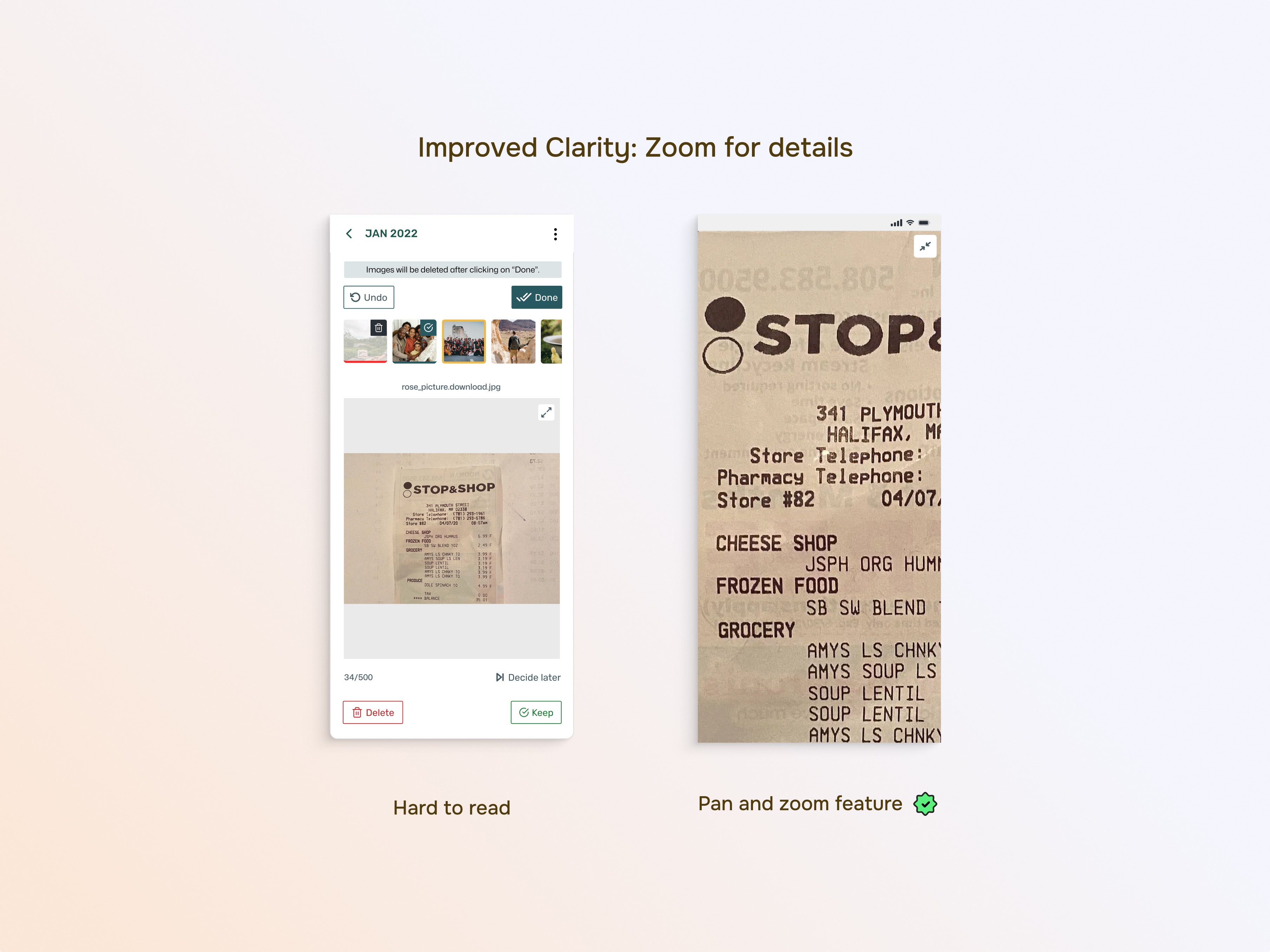
Users recommend adding a zoom feature during deletion to better assess images, especially when text is present.
2
Zoom
Users recommend adding a zoom feature during deletion to better assess images, especially when text is present.
2
Zoom
Users recommend adding a zoom feature during deletion to better assess images, especially when text is present.
2
Zoom
Users recommend adding a zoom feature during deletion to better assess images, especially when text is present.
2
Zoom
Users recommend adding a zoom feature during deletion to better assess images, especially when text is present.
3
Privacy
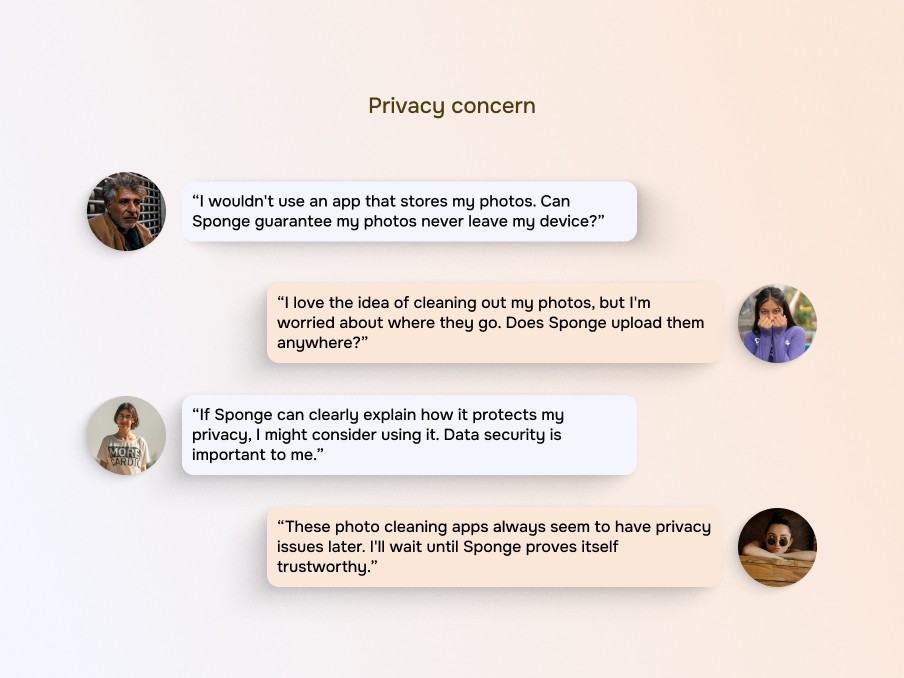
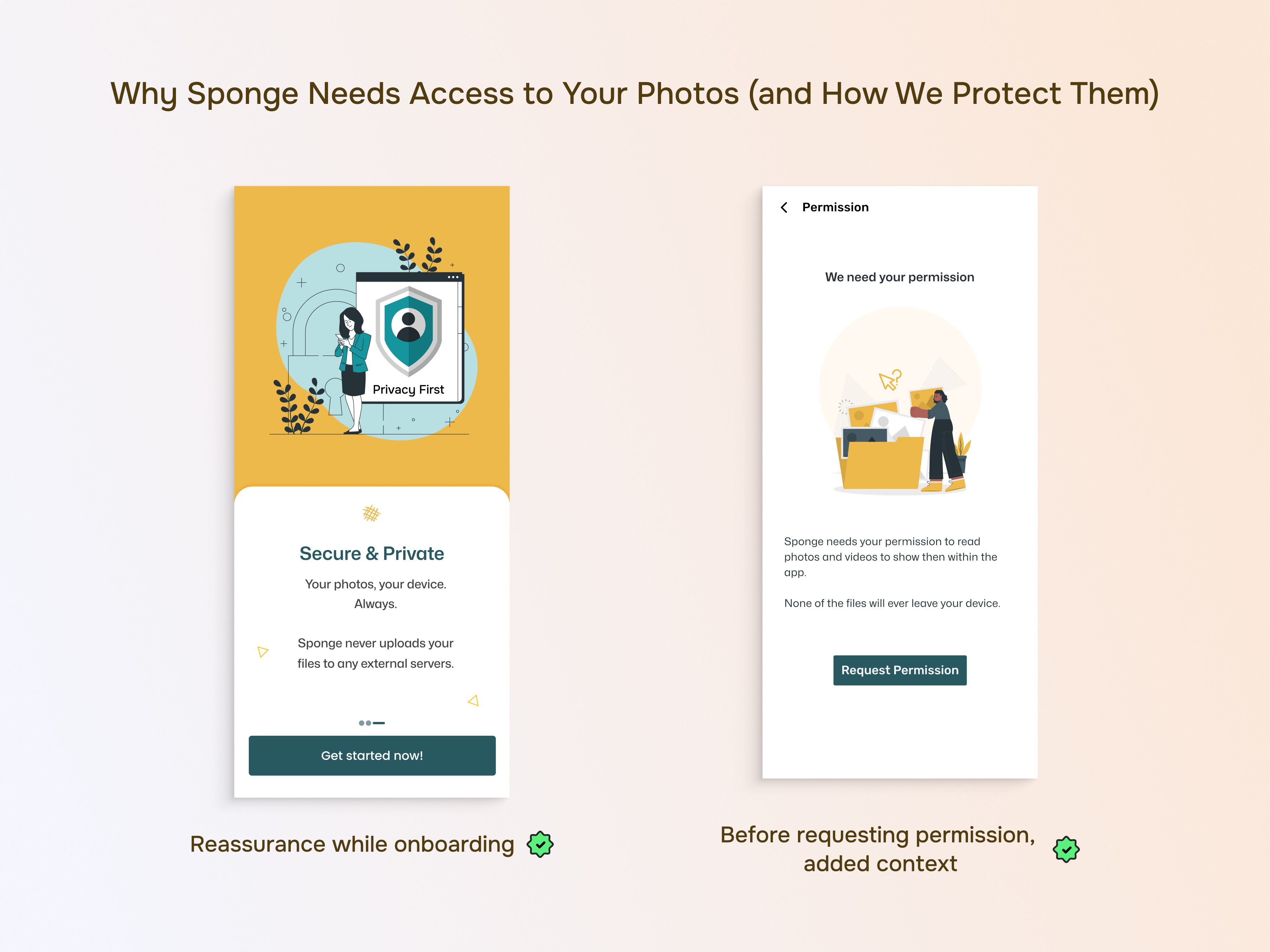
Users express confusion and concern about the possibility of the app uploading their photos online.
3
Privacy
Users express confusion and concern about the possibility of the app uploading their photos online.
3
Privacy
Users express confusion and concern about the possibility of the app uploading their photos online.
3
Privacy
Users express confusion and concern about the possibility of the app uploading their photos online.
3
Privacy
Users express confusion and concern about the possibility of the app uploading their photos online.
UI Optimization
UI Optimization
Due to perceived clutter, we adopted a data-driven approach to optimize the user experience. We analyzed user interaction data to identify the least used elements on the cleaning screen.
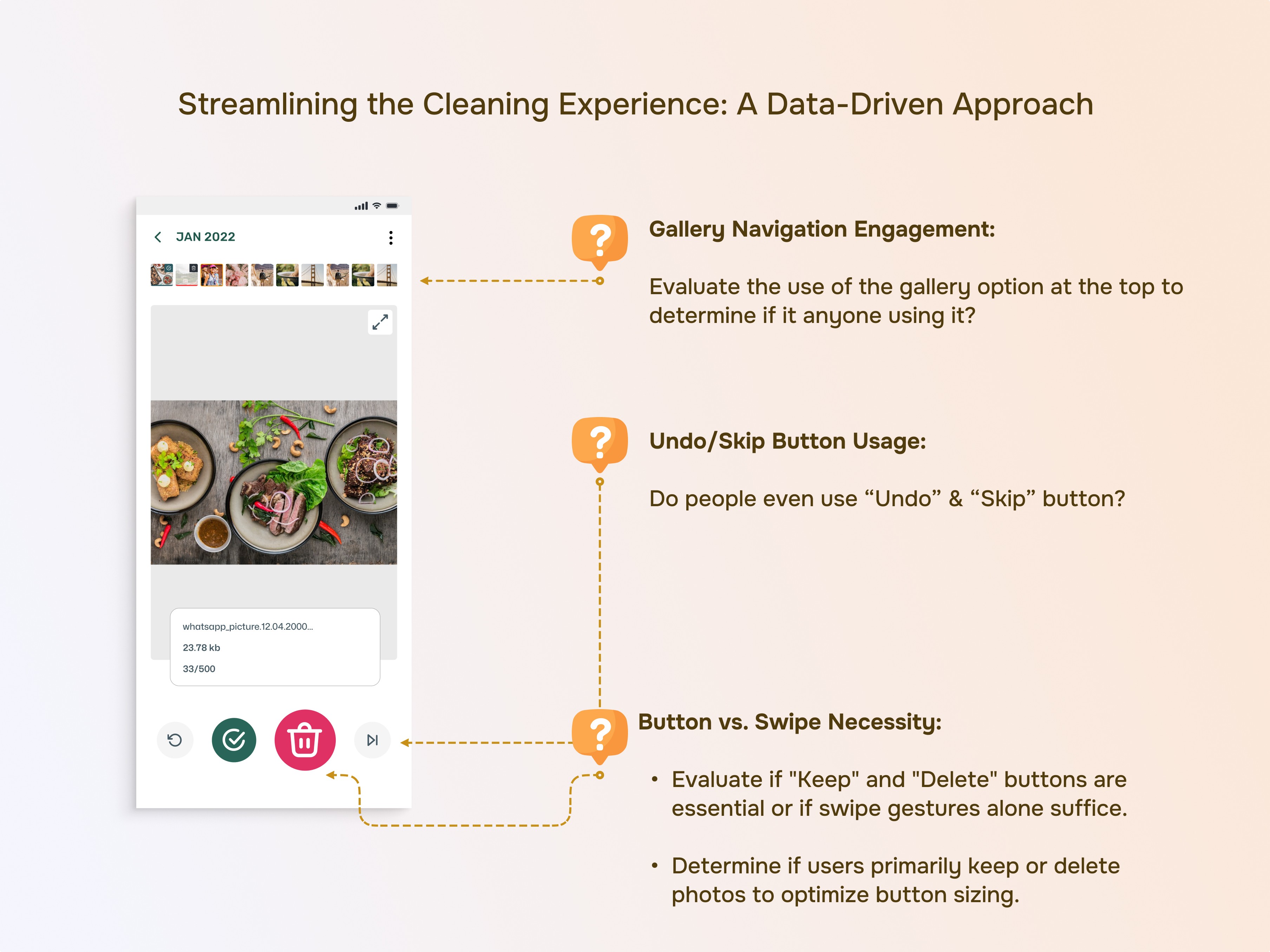
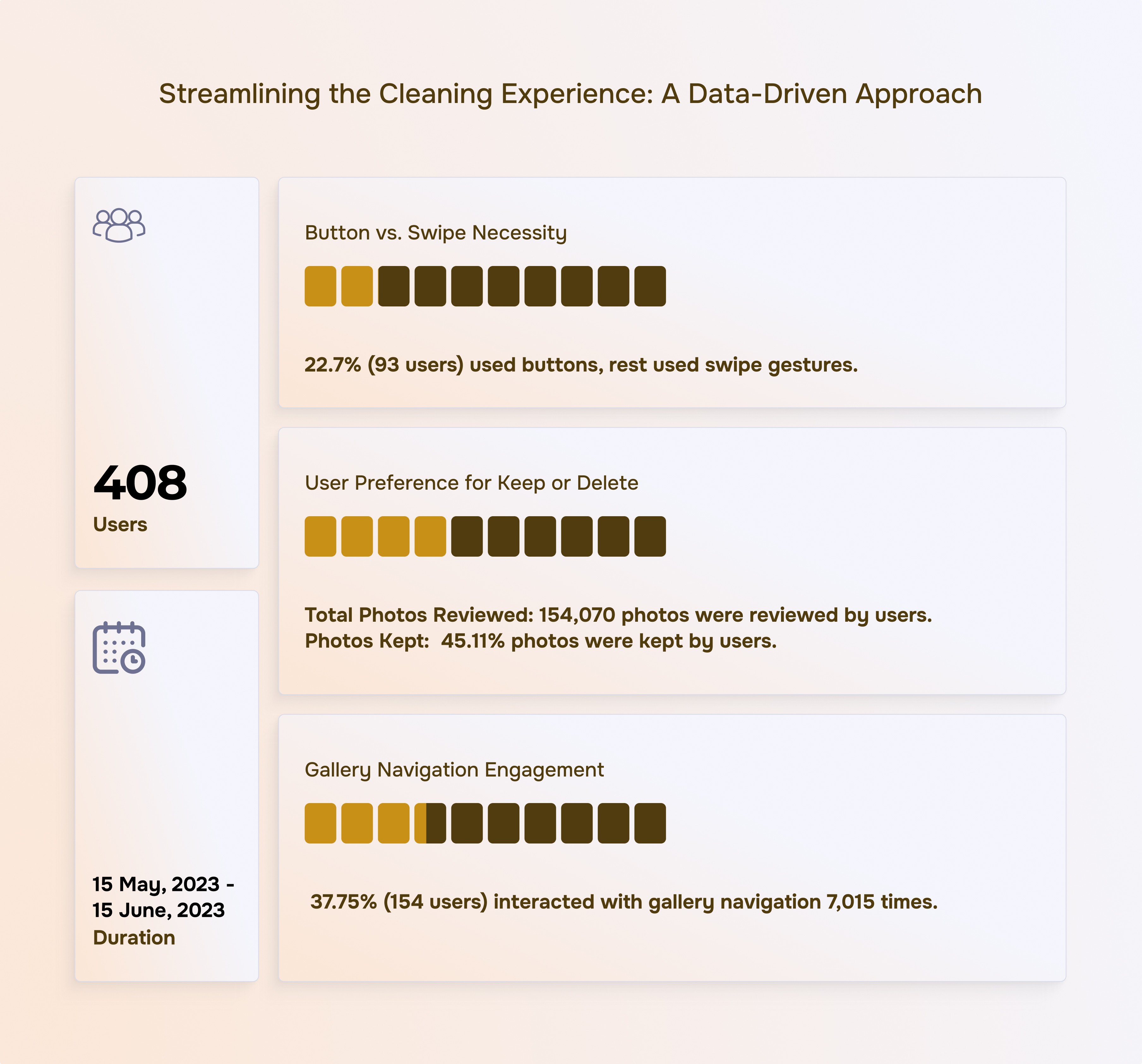
That's how we reach here…
That's how we reach here…
New Features
New Features
1
Accessibility - Left-Handed Mode
Recognizing not everyone is right-handed, we've added a left-handed mode that adjusts the user interface for a more comfortable experience
1
Accessibility - Left-Handed Mode
Recognizing not everyone is right-handed, we've added a left-handed mode that adjusts the user interface for a more comfortable experience
1
Accessibility - Left-Handed Mode
Recognizing not everyone is right-handed, we've added a left-handed mode that adjusts the user interface for a more comfortable experience
1
Accessibility - Left-Handed Mode
Recognizing not everyone is right-handed, we've added a left-handed mode that adjusts the user interface for a more comfortable experience
1
Accessibility - Left-Handed Mode
Recognizing not everyone is right-handed, we've added a left-handed mode that adjusts the user interface for a more comfortable experience
2
Bite size cleaning -Declutter Daily 50
A "Declutter 50 Pics of the Day" banner appears daily, showcasing a random selection of 50 photos from your gallery.
2
Bite size cleaning -Declutter Daily 50
A "Declutter 50 Pics of the Day" banner appears daily, showcasing a random selection of 50 photos from your gallery.
2
Bite size cleaning -Declutter Daily 50
A "Declutter 50 Pics of the Day" banner appears daily, showcasing a random selection of 50 photos from your gallery.
2
Bite size cleaning -Declutter Daily 50
A "Declutter 50 Pics of the Day" banner appears daily, showcasing a random selection of 50 photos from your gallery.
2
Bite size cleaning -Declutter Daily 50
A "Declutter 50 Pics of the Day" banner appears daily, showcasing a random selection of 50 photos from your gallery.
3
Monetization Strategy
Responding to user requests, we've introduced premium folder management. This feature empowers you to organize your photos in a more structured way, with options to sort by size, date, name, and other criteria.
3
Monetization Strategy
Responding to user requests, we've introduced premium folder management. This feature empowers you to organize your photos in a more structured way, with options to sort by size, date, name, and other criteria.
3
Monetization Strategy
Responding to user requests, we've introduced premium folder management. This feature empowers you to organize your photos in a more structured way, with options to sort by size, date, name, and other criteria.
3
Monetization Strategy
Responding to user requests, we've introduced premium folder management. This feature empowers you to organize your photos in a more structured way, with options to sort by size, date, name, and other criteria.
3
Monetization Strategy
Responding to user requests, we've introduced premium folder management. This feature empowers you to organize your photos in a more structured way, with options to sort by size, date, name, and other criteria.
🎬Behind the Design
🎬Behind the Design
See how we explored user needs, iterated on solutions, and landed on the final design.
See how we explored user needs, iterated on solutions, and landed on the final design.